1. Sensors –
Automate Routes using Sensors
2. Learn and Play – New
Version
3. Auto Route – Improved
Prediction Algorithm
4. Bug Fix – As Reported
by Users
Sensors Based Automation
Stage 1:
Plan your route and decide where you want to
locate your sensors. We recommend using Marklin Track Detection Tracks that also
detect the direction of travel.
Stage 2:
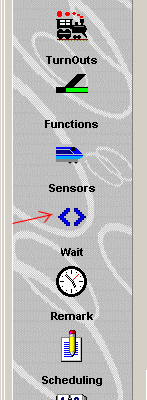
Click on the Sensors button in the Setups
panel.
Stage 3:
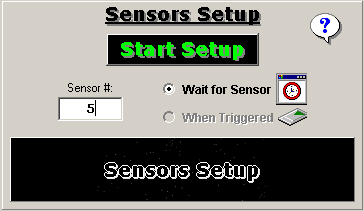
Click on the: ‘Start Sensor’ button to start
the sensor sequence. Type the number of the SENSOR that is required to be
activated.
Stage 4:
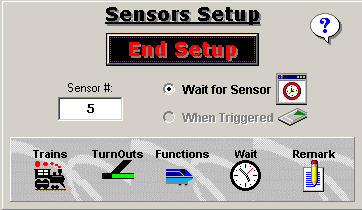
Construct the sequence of events to occur
after the SENSOR will be activated. These events may be Trains Control, Turnouts
Switching, Wait Time and Functions. You may also add remarks to document
the Auto Route step.
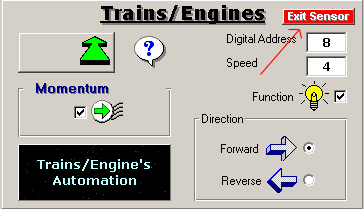
Please
Notice: Exit using the: ‘Exit
Sensor’ button on each control panel. (Upper Right)
Stage 5:
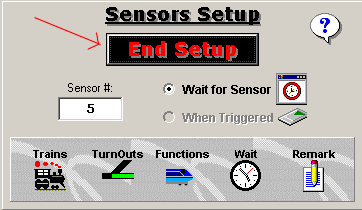
After completing the Sensor’s sequence, click
on the: ‘End Setup’. This will complete the SENSOR setup.
When Auto Route is
executed the system will wait for the requested SENSOR to be triggered. With the
triggering of the SENSOR, the entire sequence will be executed.
Learn and Play
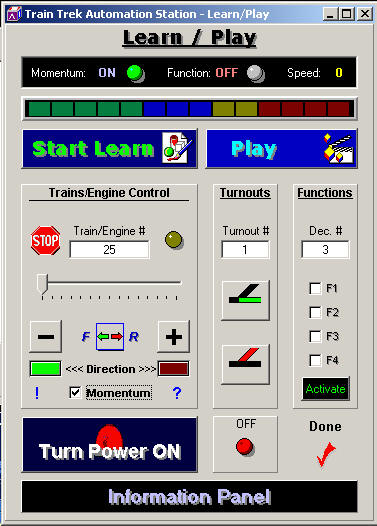
We re-designed the Learn
and Play module. Now user can control the trains, switch turnouts and activate
Functions along with this feature.
Auto Route Improvement
We improved the Auto
Route execution routine. New internal algorithm has been developed to ensure
smooth automatic operation for the entire layout.
Bug - Fix
We fixed bugs according
to user’s reports.
For
any questions please email us at: info@tayden.com