|
UltimatData™
Database System
New Era in
Database Solutions
Reports
UltimateData™ provides you with a powerful reporting
system. The reports covers categories, sub-categories, items and
statistics. You can create reports in one of two ways.
Category, Sub-Category and Items
Report
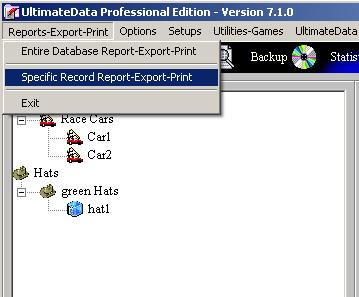
Method 1: Select the Category using Left
Mouse Click and then open the pull-down menu 'Reports-Export-Print'.
Choose 'Specific Record Report-Export-Print' option.
- - Select the Category,
Sub-Category or Item from the Tree using Left Mouse button.
- - Click on the 'Reports-Export-Print'
pull down menu and select: 'Specific Record Report-Export-Print'.
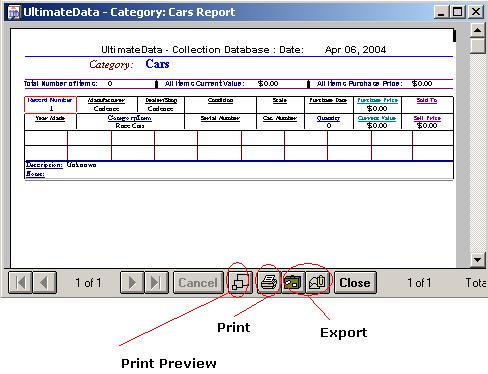
- The category or Sub-category report will open presenting all items
within the category, sub-category.
- - You can directly
EXPORT from the report.
- - You can
directly PRINT from the report.
-
-
-
-
Method 2: Right Click on the Category,
Sub-Category or Item and using the
'Specific Record Report-Export-Print' pull down menu option.
-
-
-
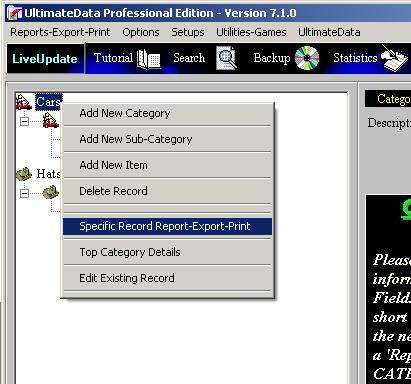
- Right Click on a selected Category, Sub-Category or Item. A pull-down menu will
open.
- - Click on the:
'Specific Record Report-Export-Print'' menu option.
- The category or Sub-category report will open presenting all items
within the category, sub-category.
- You can directly EXPORT from the report.
- You can directly PRINT from the report.
-
-
Please Note: The program EXPORT to major
database/editing/spreadsheet programs. Among these programs are: MS
Excel, MS Word, Lotus and more. Also you may EXPORT to HTML and Text
formats.
Entire Database Report
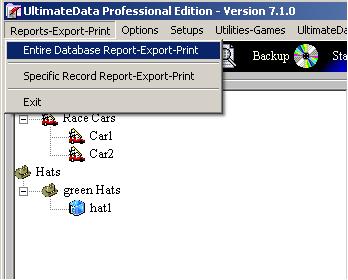
In a similar way you may produce the entire database report. Use
the pull-down menu: 'Reports-Export-Print' and choose: 'Entire Database
Report-Export-Print' option.
Statistics Report
You may produce database statistics report in one of two ways.
Method 1: Select the Category using Left
Mouse Click and then click on the 'Statistics' buton.
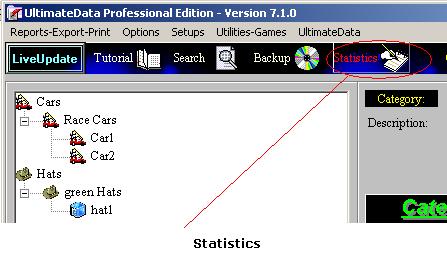
Method 2: Select the Category,
Sub-Category or Item using Left Mouse click and open the 'Options' pull down
menu. Select the 'Statistics' option.
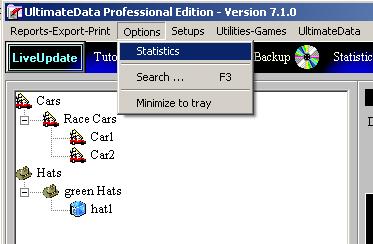
For
any questions please email us at: info@tayden.com

|
|
|