 |
Troubleshooting |
|
|
|
|
Train Trek Layout Simulation™ (LS) - Troubleshooting |
|
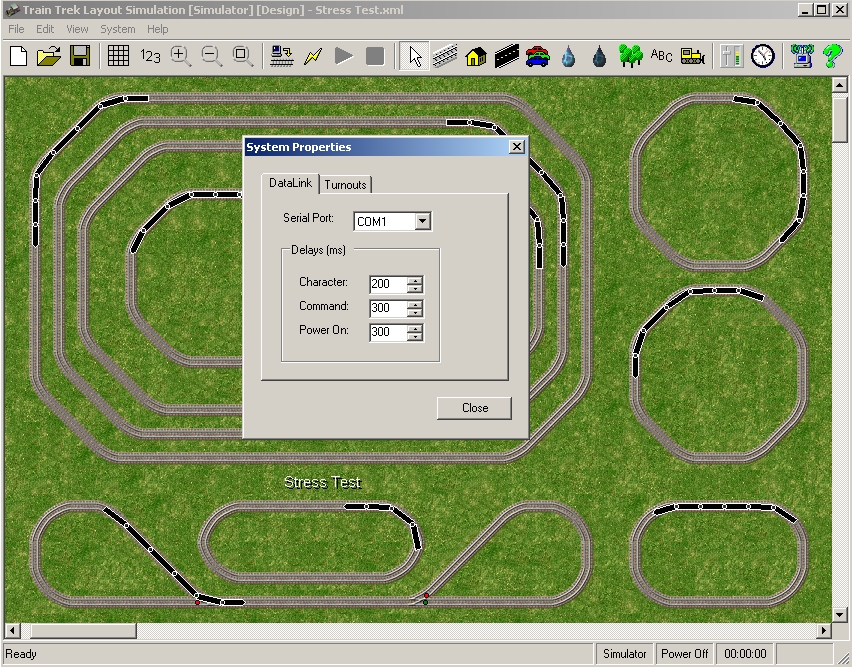
| Problem #1 There is no communication with Train Trek Layout Simulation™ (LS)™ Solution A. Using the 'Communications Setup' utility, try to change PORT. For Example: If your computer has four (4) PORTS, try each one of them and then try to turn the power ON. B. Make sure the Command and Power On values are set to: 300. Character should also be set to: 200.
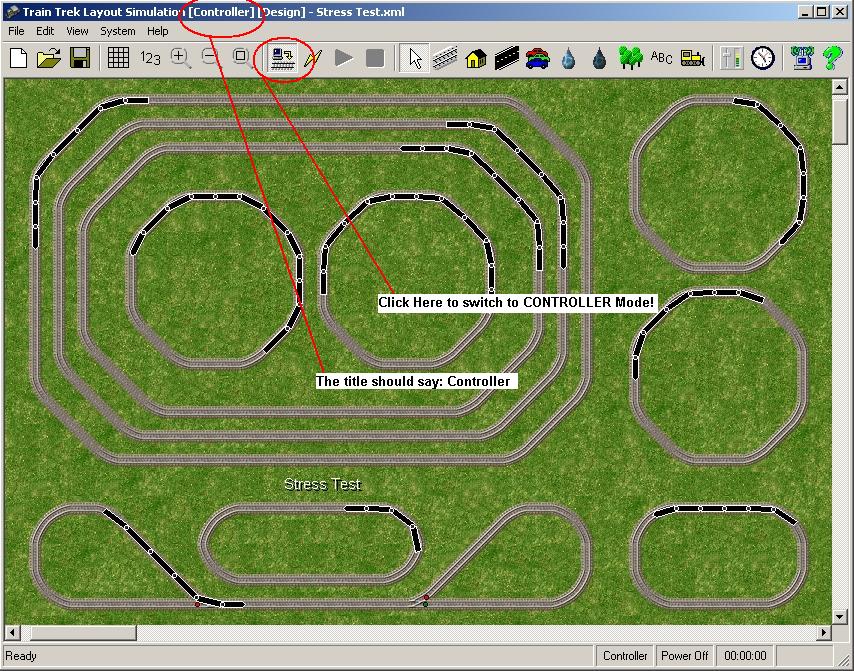
C. Make sure that you switched to CONTROLLER Mode! In Simulator Mode, you are not able to run your layout.
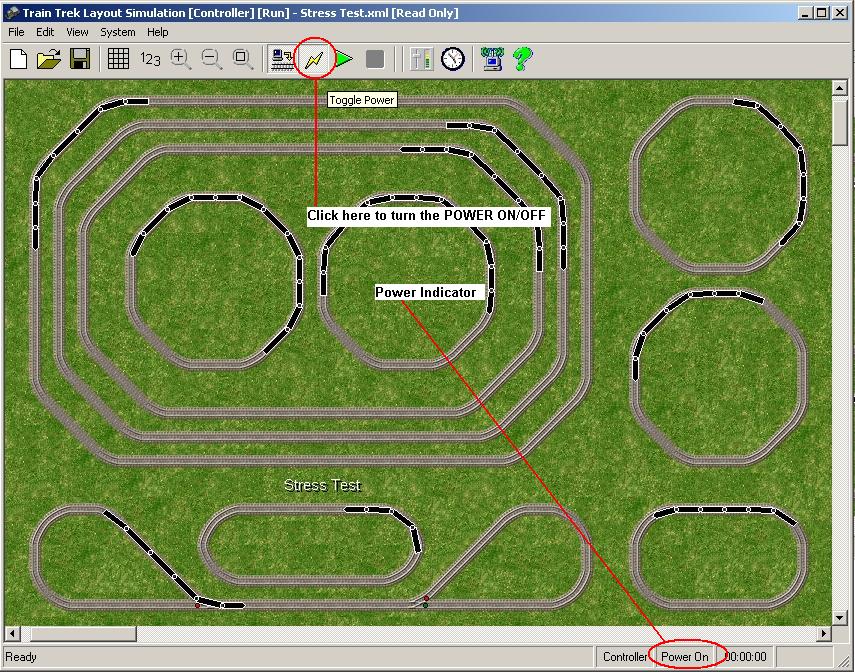
D. When in CONTROLLER Mode, Click on the Power On button to turn the Power ON.
E. When clicking on the Power ON button note Marklin RED POWER LED turned ON/OFF. Warning! Without the correct communication setup Train Trek Layout Simulation™ (LS)™ will not be able to control your layout properly! Problem #2 Trains/engines are not running. Solution A. Make sure that there is power to the track. Try to run the train from the control unit (6021) alone. If it is running, reset the power to the digital system or it will not respond to the Train Trek Layout Simulation™ (LS)™. If it is not responding then the problem is with your system. Refer to the user manual of your system. B. Make sure that the correct Digital Address is in the Dig. Code field. C. Make sure that you have established the communication with the interface. (refer to Problem #1) D. Make sure the Train with correct digital address is on the track. E. Make sure the train is not previously activated by the central unit alone. If it has, it may have locked it. Reset the system by turning the power on and then off again or by choosing another digital address and then the address you are trying to run. Problem #3 Turnouts and/or Accessories are not working. Solution A. Make sure that there is power to the track. Try to switch the turn out from the keyboard alone. If it is switches, reset the power to the digital system or it will not respond to the Train Trek Layout Simulation™ (LS)™. If it is not responding then the problem is with your system. Refer to the user manual of your system. B. Make sure that the correct Digital Address is in the Dig. Code field. C. Make sure that you have established the communication with the interface. (refer to problem #1) D. Make sure the turnout has the correct digital address. Problem #4 Functions of function decoder do not work. Solution A. Make sure that there is power to the track. Try to activate the accessory/function from the control unit (6021) alone. If it is running, reset the power to the digital system or it will not respond to the Train Trek Layout Simulation™ (LS)™. If it is not responding then the problem is with your system. Refer to the user manual of your system. B. Make sure that the correct Digital Address is in the Dig. Code field. C. Make sure that you have established the communication with the interface. (refer to problem #1) D. Make sure the accessory/function has the correct digital address. E. Make sure the accessory/function has not previously been activated by the control unit alone. If it has, it may have locked it. Reset by turning the power on and then off again or by choosing another digital address and then the address you are trying to activate Problem #5 System stop responding in the middle of an operation. Solution A. Sometimes due to communication failure, an error can occur and the system will be unable to respond. You will need to turn the Märklin Digital system off and on again, also restarting Train Trek Layout Simulation™ (LS)™. This is not a problem with Train Trek Layout Simulation™ (LS)™, It can be due to many things such as noise, random protocol error or even a minor power surge. For any complications that you may incur that we have not described, Please use the information below to contact us and we will respond promptly. |
|
|
|
Internet Support |
| We are committed to respond within hours to any Internet Technical support issue. For our 24/7
internet Technical support please email: support@tayden.com
Please include in your email the following details: 1. The product's name and Version. 2. Where it was purchased. 3. Your operating system, computer system, memory size (MB RAM). 4. The exact problem including all Error Messages. We guarantee a response within hours!
|
|
| Tayden Design Technical Publications Copyright © 2010 Tayden Design, Inc. All rights reserved. Revised: April 01, 2010 |
|